Revision Control
Standardized Revision Control Process for Engineering Drawings
This page describes the standardized process for revision control of engineering drawings and drawing sets. Consistent revision practices are essential for traceability, maintaining project integrity, and ensuring clear communication among all stakeholders, including design teams, clients, contractors, and fabricators.
Revision Numbering System
Core Guidelines
- Drawing-Based Revisions: Revision numbers are managed at the individual drawing level, not for the entire drawing set.
- Whole Number Revisions: Use whole numbers (e.g., Rev 1, Rev 2) for significant changes or to address formal submittal comments requiring resubmission.
- Decimal Revisions: Use decimal increments (e.g., Rev 0.1, Rev 1.1) for minor corrections or updates that do not require formal resubmittal.
Step-by-Step Process Examples
Initial Project State
- Drawing A (Plans): Rev 0
- Drawing B (Electrical): Rev 0
- Drawing C (Details): Rev 0
- Drawing Set: Rev 0 (first submittal)
Scenario 1: Major Changes (Resubmission Required)
Situation: Drawing B needs wiring revisions based on client feedback; Drawing C needs extra BOM items.
- Drawing A: Stays at Rev 0
- Drawing B: Rev 0 → Rev 1 (wiring updated)
- Drawing C: Rev 0 → Rev 1 (BOM updated)
- Drawing Set: Rev 1 (re-submittal issued)
- Note: Update each drawing’s revision table with specific change descriptions.
Scenario 2: Minor Internal Corrections
Situation: Spelling error in Drawing A found during internal review.
- Drawing A: Rev 0 → Rev 0.1 (spelling corrected)
- Drawing B/C: Unchanged, retain previous revisions
- Drawing Set: Rev 1.1 (for internal use; e.g., panel shop)
- Note: Only Drawing A’s revision table is updated.
Scenario 3: Further Major Revisions
Situation: Drawing C needs more BOM updates based on fabricator feedback.
- Drawing C: Rev 1 → Rev 2 (BOM updated)
- Drawing Set: Rev 2 (re-submittal issued)
- Note: All unchanged drawings retain their revision numbers.
Scenario 4: As-Built Documentation
Situation: Construction is complete and final as-built documentation is required.
- Drawing A: Rev 0.1 (field verified)
- Drawing B: Rev 1 (field verified)
- Drawing C: Rev 2 (field verified)
- Drawing Set: As Built (final documentation issued)
Managing the Revision Table
Required Information for Each Revision
Every drawing revision table should capture:
- Revision number
- Date of revision
- Detailed change description (avoid vague/general notes)
- Engineer or designer initials
- Checker initials (if applicable)
Table Maintenance Best Practices
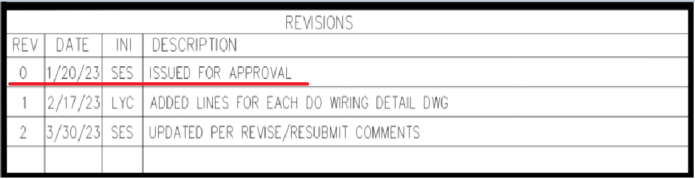
- No Rev 0 Entry: Don't create a revision table entry for initial (Rev 0) drawings.
- No As Built Entry: As-built drawings do not require additional revision table entries.
- Specific Descriptions: Use clear, detailed descriptions for each change, rather than generic phrases such as "Updates per Revise and Resubmit comments."
Add As Built date, delete Rev box (if applicable)
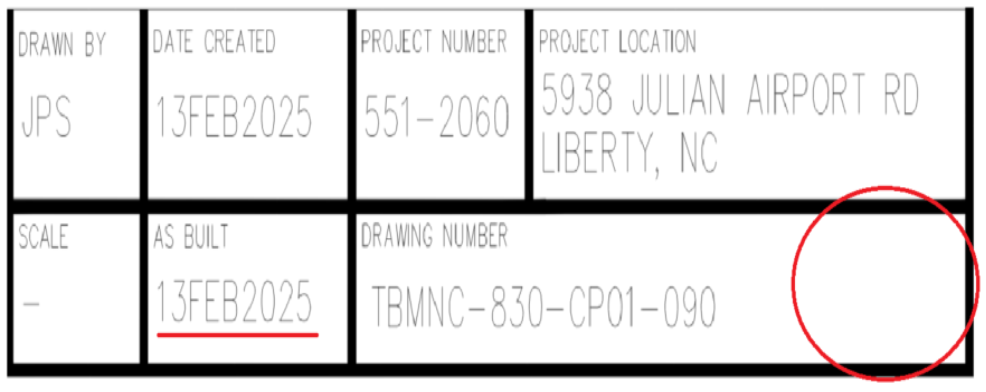
Table Version Example:
| Drawing | Initial Submittal | Drawing B requires a wiring update, and Drawing C needs an additional BOM item. Both drawings must be resubmitted. | Drawing A contains a spelling mistake, but resubmission is not required. | Drawing C requires updates to the bill of materials and must be resubmitted. | As-builts are completed, all drawings updated. |
|---|---|---|---|---|---|
| A | 0 | 0 | 0.1 | 0.1 | 0.1 |
| B | 0 | 1 | 1 | 1 | 1 |
| C | 0 | 1 | 1 | 2 | 2 |
| D | 0 | 1 | 1.1 | 2 | As Built |
Revision History
| Revision | Date | Name | Description |
|---|---|---|---|
| 1.0.0 | 07/20/2025 | Sneha Karnik | Initial Implementation |
For any questions regarding revision control procedures, please contact the Enterprise Opeations team.